
Perfect Player IPTV Setup 2026: M3U & EPG Guide
Last updated: · 3 min read · Playlist IPTV (TEST)
Works on
TL;DR: Open Perfect Player → tap the gear icon → Settings → General → Playlist → Add, paste your M3U playlist URL; then Settings → EPG → Add and paste your EPG URL. Back on the main screen your channels load, and the Guide tab shows the TV schedule. The app is free (ad-supported) with an optional paid upgrade.
Important: Perfect Player is a player only — channels come from your IPTV subscription. The official developer site is niklabs.com — install the app only from official app stores. No subscription yet? Get instant activation here.
Step 1: Install Perfect Player on your device#
On Android / Android TV / Google TV
- Open the Google Play Store.
- Search for Perfect Player IPTV and press Install.
- Open the app.
On Amazon Firestick / Fire TV
Perfect Player is not in the Amazon Appstore — sideload it:
- Install the free Downloader app (Find → Search → "Downloader").
- Enable Install unknown apps for Downloader (Settings → My Fire TV → Developer options).
- In Downloader, enter the official Perfect Player download address, install the APK, and open it.
Step 2: Add your M3U playlist#
- In Perfect Player, tap the gear icon to open Settings.
- Go to General → Playlist → Add.
- Paste your M3U playlist URL from your IPTV subscription welcome email.
- Name it anything you like (e.g. "My IPTV") and save.
- Return to the main screen — the channel list loads.
Step 3: Add the EPG TV guide#
- Go back to Settings → EPG → Add.
- Paste your EPG URL (XMLTV format) from your welcome email.
- Save and return to the main screen.
- Open the Guide tab — give it a few minutes on the first sync, then program titles appear.
If the guide shows "No information", verify the EPG URL was saved correctly and re-open the Guide tab after a few minutes.
Free vs Full version#
- Free: everything you need to watch — full playlist and EPG support, with ads.
- Full (paid upgrade inside the app): removes ads and unlocks extra interface options.
The free version is enough for daily watching. Your IPTV subscription is separate either way.
Fix buffering and playback issues#
- Stuttering streams: Settings → Playback → Decoder — try Hardware on modern devices; switch to Software if you get glitches or a black screen.
- Increase the buffer: Settings → Playback → raise the Buffer Size if streams pause on slower connections.
- Still buffering on every channel: that's your network, not the app — use Ethernet or 5 GHz Wi-Fi, and test the same channel on mobile data to rule out ISP throttling.
Full troubleshooting: IPTV error codes & fixes.
Frequently Asked Questions
Is Perfect Player free?
The base app is free with ads. A paid "Full version" upgrade inside the app removes ads. Your IPTV subscription is separate.
Does Perfect Player support Xtream Codes?
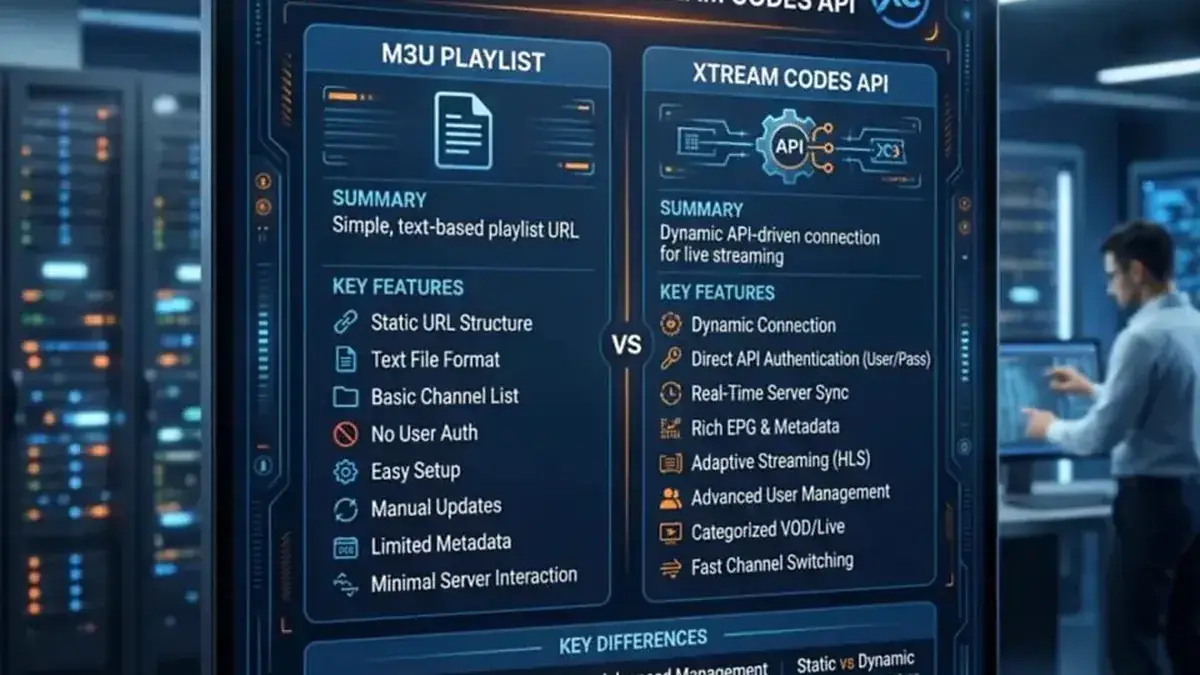
No — it uses M3U/XSPF playlists plus a separate EPG source. Your subscription's M3U + EPG URLs cover this completely.
EPG shows "No information" — what now?
Verify the EPG URL was saved correctly, wait for the first sync to finish (a few minutes), then re-open the Guide tab.
Perfect Player vs TiviMate — which is better?
TiviMate has the more polished TV interface and supports Xtream Codes login; Perfect Player is lighter and simpler. Both play the same subscription — try both free and keep the one you prefer. See our TiviMate guide.
Related guides
Ready to watch? Get your IPTV subscription now.
Instant activation — M3U playlist + Xtream Codes login + EPG, delivered by email in minutes. Pay with Bitcoin.
Buy IPTV Subscription