
Install TiviMate on Firestick & Android TV (2026 Guide)
Last updated: · 5 min read · Playlist IPTV (TEST)

Works on
TL;DR: Install TiviMate, open it, choose Add playlist → Xtream Codes login, and enter the server URL, username and password from your IPTV subscription email. That's it — channels, movies and the TV guide load automatically. Prefer M3U? Choose M3U playlist instead and paste your playlist URL.
Important: TiviMate is only a player — it sells no channels. You need an IPTV subscription (like ours) plus the TiviMate app to watch. No subscription yet? Get instant activation here.
Step 1: Install TiviMate on your device#
On Amazon Firestick / Fire TV
TiviMate is not in the Amazon Appstore, so you sideload it with the free Downloader app:
- From the Firestick home screen, open Find → Search and type Downloader.
- Install the orange Downloader app by AFTVnews and open it.
- Go to Settings → My Fire TV → Developer options and turn ON "Install unknown apps" for Downloader. (If Developer options is hidden, go to About and press the select button on "Fire TV Stick" 7 times.)
- Back in Downloader, type the official TiviMate download address in the URL box and press Go.
- When the APK finishes downloading, press Install, then Open.
- Pin TiviMate to your Firestick home row for one-click access.
On Android TV / Google TV / Nvidia Shield
- Open the Google Play Store on your TV.
- Search for TiviMate IPTV Player and press Install.
- Open the app once installation finishes.
Step 2: Add your IPTV subscription (Xtream Codes recommended)#
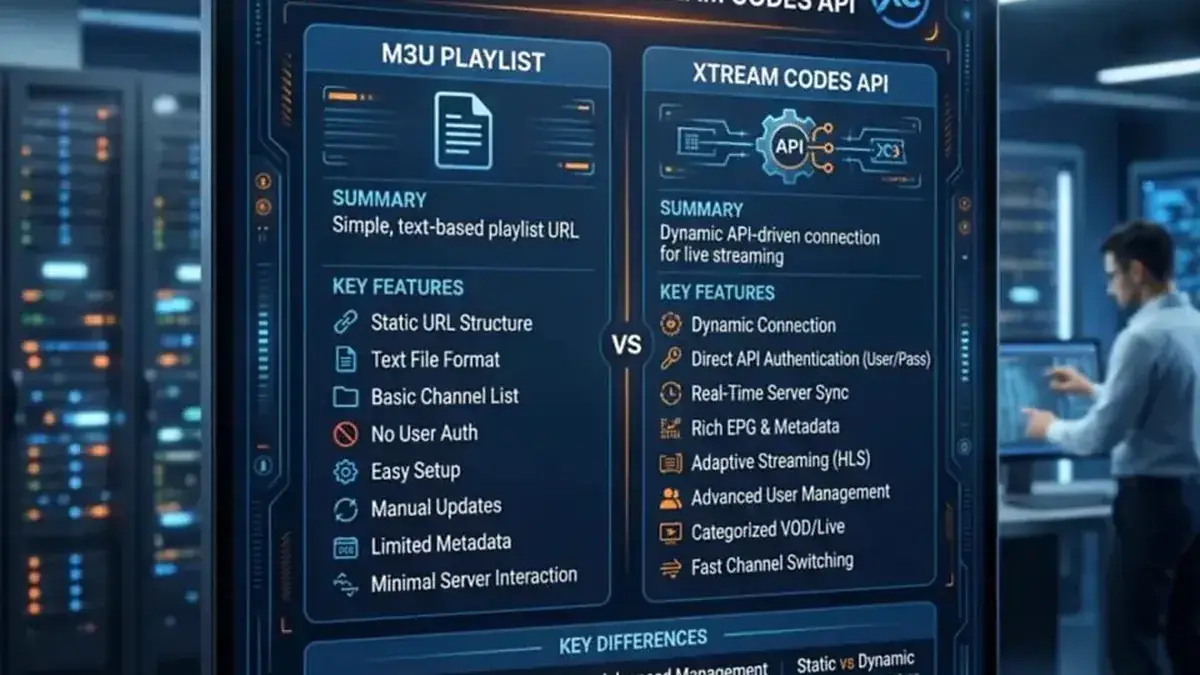
Xtream Codes is the better login method: it imports channels, categories, VOD and the EPG TV guide automatically in one step.
- Open TiviMate and select Add playlist on the welcome screen.
- Choose Xtream Codes login (not M3U).
- Enter the Server URL exactly as in your subscription welcome email — including
http://and the port number (e.g.http://server.example.com:8080). - Enter your Username and Password carefully — they are case-sensitive, and a trailing space is the most common cause of "login failed".
- Tick Include VOD if your IPTV subscription includes movies and series.
- Press Next and wait 1–3 minutes while TiviMate loads your channels, movies and the TV guide.
Or add an M3U playlist instead
- Open TiviMate and select Add playlist.
- Choose M3U playlist and paste your full playlist URL (long-press the select button to paste on TV remotes).
- Name the playlist (e.g. "My IPTV") and press Done.
- Go to Settings → EPG → EPG sources → Add source and paste your EPG URL from the welcome email, so the TV guide fills in.
New to these two methods? Read M3U vs Xtream Codes first.
Step 3: Set up the EPG TV guide#
The EPG turns a bare channel list into a real TV guide with show titles and times.
- With Xtream Codes, the EPG loads automatically — open the guide and check that program titles appear. If they do, you're done.
- With M3U, confirm your EPG source is added under Settings → EPG → EPG sources.
- Enable Update on app start so the guide refreshes every time you open TiviMate.
- Set the update interval to 12 or 24 hours — fresh schedules without slowing down the app.
TiviMate free vs Premium#
- Free: one playlist, basic playback. Enough to test your IPTV subscription.
- Premium (paid, via the separate TiviMate Companion app on Google Play): multiple playlists, favorites, catch-up, recording, auto EPG update. One license covers up to 5 devices.
TiviMate Premium activation — we don't sell it#
We do not sell TiviMate activation or Premium. The player's developer sells it directly — only from tivimate.com or the official TiviMate Companion app on Google Play. Any website offering to "activate TiviMate" for you is a scam.
How the official activation works:
- Open TiviMate on your device → Settings → Unlock Premium. The screen shows your account details.
- On a phone or computer, go to tivimate.com, sign in (or create an account), and buy Premium for your device. One license covers up to 5 devices on the same account.
- Return to the TV app — Premium unlocks automatically once payment is confirmed.
If the payment option doesn't appear on tivimate.com: it's blocked in your country. In that case:
- On your phone, install TiviMate Companion from the Google Play Store (same Google account as your TV if possible).
- Open Companion, sign in with your TiviMate account, and buy Premium inside the app — Google Play handles the payment, so the country block doesn't apply.
- Open TiviMate on your TV — it unlocks under the same account.
Premium is a one-time purchase for the player app. Your IPTV channel subscription is a separate product, paid to your provider.
Frequently Asked Questions
Is TiviMate free?
The player is free with one playlist. Premium is a paid upgrade for extra features. Your IPTV subscription is separate and paid to your provider.
Where do I enter Xtream Codes in TiviMate?
Open TiviMate → Add playlist → Xtream Codes login. Enter the server URL, username and password from your subscription email — not the M3U link.
Do I need an IPTV subscription to use TiviMate?
Yes. TiviMate is only a player app with no channels included. You need an IPTV subscription from a provider — after ordering, you get the Xtream Codes login or M3U playlist by email.
Why is my EPG empty in TiviMate?
With Xtream Codes it fills automatically — give it a few minutes and check your connection. With M3U you must add the EPG URL manually under Settings → EPG → EPG sources.
Can I use TiviMate on Firestick?
Yes. It's the most popular IPTV player on Firestick — install it via the Downloader app (Step 1 above), then follow the Xtream Codes steps.
TiviMate asks me to pay — is that the subscription?
No. That is TiviMate Premium (the player's own optional upgrade, sold only by its developer). Your IPTV channel subscription is a separate product.
Related guides

Ready to watch? Get your IPTV subscription now.
Instant activation — M3U playlist + Xtream Codes login + EPG, delivered by email in minutes. Pay with Bitcoin.
Buy IPTV Subscription